[tuto] DIY Lost Alarm (Drone Keeper Style)
Posté : 09 sept. 2016, 19:04
Hello
Voici l’embauche d'un petit projet pour faire soit même un Drone Keeper pour ça il vous faut :
Un arduino 328 en 5v ou 3v :
http://www.banggood.com/Wholesale-New-V ... 68534.html
Un gyroscope (compatible 5v) :
http://www.banggood.com/6DOF-MPU-6050-3 ... 80862.html
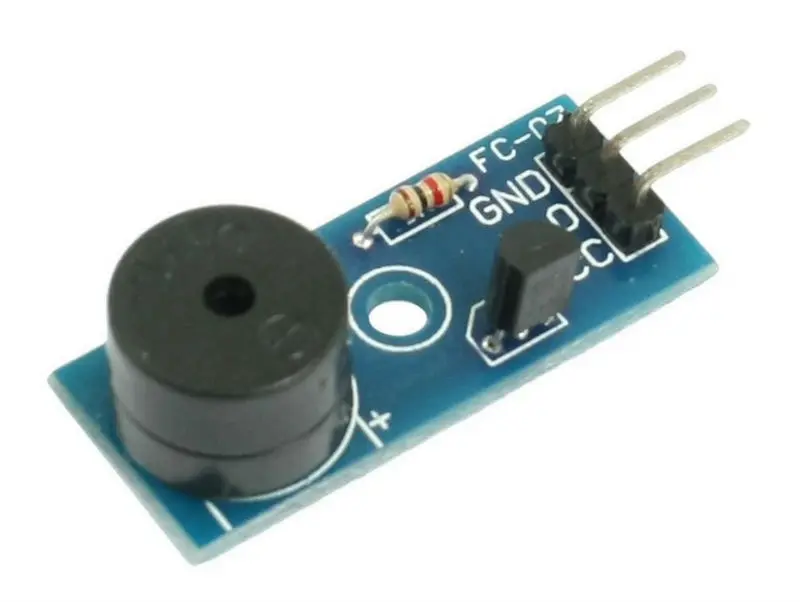
Un buzzer :
http://www.banggood.com/DC-1-30V-2-Pins ... 78657.html
Une lipo 1s, peu importe le modèle
Un convertisseur TTL RS232 sinon un arduino en usb
Source :
http://playground.arduino.cc/Main/MPU-6050
Schéma :

Donc on a notre GY-521
VCC -> VCC
GND -> GND
SCL -> A5
SDA -> A4
INT -> 2
Notre Buzzer :
+ -> pin 13
- -> GND
Pour finir on installe le soft Arduino:
https://www.arduino.cc/en/Main/Software
On connecte notre TTL RS232 à l'arduino comme pour un UART d'un contrôleur de vol (on croise RX/TX)
Une fois connecté au PC le Port COM apparait , on le renseigne dans le soft Arduino
- le bon modèle : "Arduino mini"
- Processeur ATmega328
- le bon port com
Pour injecter le code il faut la bibliothèque "MPU-6050 Accelerometer + Gyro" et le code :
https://mega.nz/#!6ZQASBDB!Y83cdJ_i4ZvC ... TLfSI5Aegg
Je suis parti de l'exemple du site arduino et j'ai rajouté un test toutes les secondes qui va comparer les dernières valeurs de X , Y et Z
Si on bouge plus ça sonne.
J'ai mis plusieurs fréquences sur le buzzer pour chercher celle qui s’entend le plus loin.
Prochaine étape miniaturiser tout ça.
Voici l’embauche d'un petit projet pour faire soit même un Drone Keeper pour ça il vous faut :
Un arduino 328 en 5v ou 3v :
http://www.banggood.com/Wholesale-New-V ... 68534.html
Un gyroscope (compatible 5v) :
http://www.banggood.com/6DOF-MPU-6050-3 ... 80862.html
Un buzzer :
http://www.banggood.com/DC-1-30V-2-Pins ... 78657.html
Une lipo 1s, peu importe le modèle
Un convertisseur TTL RS232 sinon un arduino en usb
Source :
http://playground.arduino.cc/Main/MPU-6050
Schéma :
Donc on a notre GY-521
VCC -> VCC
GND -> GND
SCL -> A5
SDA -> A4
INT -> 2
Notre Buzzer :
+ -> pin 13
- -> GND
Pour finir on installe le soft Arduino:
https://www.arduino.cc/en/Main/Software
On connecte notre TTL RS232 à l'arduino comme pour un UART d'un contrôleur de vol (on croise RX/TX)
Une fois connecté au PC le Port COM apparait , on le renseigne dans le soft Arduino
- le bon modèle : "Arduino mini"
- Processeur ATmega328
- le bon port com
Pour injecter le code il faut la bibliothèque "MPU-6050 Accelerometer + Gyro" et le code :
https://mega.nz/#!6ZQASBDB!Y83cdJ_i4ZvC ... TLfSI5Aegg
Code : Tout sélectionner
void buzz(int targetPin, long frequency, long length) {
  long delayValue = 1000000/frequency/2;
  long numCycles = frequency * length/ 1000;
  for (long i=0; i < numCycles; i++)
  {
    digitalWrite(targetPin,HIGH);
    delayMicroseconds(delayValue);
    digitalWrite(targetPin,LOW);
    delayMicroseconds(delayValue);
  }
}

    void setup()
    {
      int error;
      uint8_t c;


      Serial.begin(9600);
      Serial.println(F("InvenSense MPU-6050"));
      Serial.println(F("June 2012"));

      // Initialize the 'Wire' class for the I2C-bus.
      Wire.begin();


      // default at power-up:
      //    Gyro at 250 degrees second
      //    Acceleration at 2g
      //    Clock source at internal 8MHz
      //    The device is in sleep mode.
      //

      error = MPU6050_read (MPU6050_WHO_AM_I, &c, 1);
      Serial.print(F("WHO_AM_I : "));
      Serial.print(c,HEX);
      Serial.print(F(", error = "));
      Serial.println(error,DEC);

      // According to the datasheet, the 'sleep' bit
      // should read a '1'.
      // That bit has to be cleared, since the sensor
      // is in sleep mode at power-up.
      error = MPU6050_read (MPU6050_PWR_MGMT_1, &c, 1);
      Serial.print(F("PWR_MGMT_1 : "));
      Serial.print(c,HEX);
      Serial.print(F(", error = "));
      Serial.println(error,DEC);


      // Clear the 'sleep' bit to start the sensor.
      MPU6050_write_reg (MPU6050_PWR_MGMT_1, 0);
    }

    int mouvement=0;
    int old_accel_x=0;
    int old_accel_y=0;
    int old_accel_z=0;
    int counttime=0;

    void loop()
    {
      int error;
      double dT;
      accel_t_gyro_union accel_t_gyro;


      Serial.println(F(""));
      Serial.println(F("MPU-6050"));

      // Read the raw values.
      // Read 14 bytes at once,
      // containing acceleration, temperature and gyro.
      // With the default settings of the MPU-6050,
      // there is no filter enabled, and the values
      // are not very stable.
      error = MPU6050_read (MPU6050_ACCEL_XOUT_H, (uint8_t *) &accel_t_gyro, sizeof(accel_t_gyro));
      Serial.print(F("Read accel, temp and gyro, error = "));
      Serial.println(error,DEC);


      // Swap all high and low bytes.
      // After this, the registers values are swapped,
      // so the structure name like x_accel_l does no
      // longer contain the lower byte.
      uint8_t swap;
      #define SWAP(x,y) swap = x; x = y; y = swap

      SWAP (accel_t_gyro.reg.x_accel_h, accel_t_gyro.reg.x_accel_l);
      SWAP (accel_t_gyro.reg.y_accel_h, accel_t_gyro.reg.y_accel_l);
      SWAP (accel_t_gyro.reg.z_accel_h, accel_t_gyro.reg.z_accel_l);
      SWAP (accel_t_gyro.reg.t_h, accel_t_gyro.reg.t_l);
      SWAP (accel_t_gyro.reg.x_gyro_h, accel_t_gyro.reg.x_gyro_l);
      SWAP (accel_t_gyro.reg.y_gyro_h, accel_t_gyro.reg.y_gyro_l);
      SWAP (accel_t_gyro.reg.z_gyro_h, accel_t_gyro.reg.z_gyro_l);


      // Print the raw acceleration values
     /*
      Serial.print(F("accel x,y,z: "));
      Serial.print(accel_t_gyro.value.x_accel, DEC);
      Serial.print(F(", "));
      Serial.print(accel_t_gyro.value.y_accel, DEC);
      Serial.print(F(", "));
      Serial.print(accel_t_gyro.value.z_accel, DEC);
      Serial.println(F(""));
     */

      //init diff 0
     if(old_accel_x != 0)
     {
      //test change
      int differencex = abs(old_accel_x - accel_t_gyro.value.x_accel);
      int differencey = abs(old_accel_y - accel_t_gyro.value.y_accel);
      int differencez = abs(old_accel_z - accel_t_gyro.value.z_accel);

      if(differencex > 1000 || differencey > 1000 || differencez > 1000)
      mouvement=1;
      else
      mouvement=0;
     }


    old_accel_x=accel_t_gyro.value.x_accel;
    old_accel_y=accel_t_gyro.value.y_accel;
    old_accel_z=accel_t_gyro.value.z_accel;

      // The temperature sensor is -40 to +85 degrees Celsius.
      // It is a signed integer.
      // According to the datasheet:
      //   340 per degrees Celsius, -512 at 35 degrees.
      // At 0 degrees: -512 - (340 * 35) = -12412

     /*
      Serial.print(F("temperature: "));
      dT = ( (double) accel_t_gyro.value.temperature + 12412.0) / 340.0;
      Serial.print(dT, 3);
      Serial.print(F(" degrees Celsius"));
      Serial.println(F(""));
     */

      // Print the raw gyro values.
     /*
      Serial.print(F("gyro x,y,z : "));
      Serial.print(accel_t_gyro.value.x_gyro, DEC);
      Serial.print(F(", "));
      Serial.print(accel_t_gyro.value.y_gyro, DEC);
      Serial.print(F(", "));
      Serial.print(accel_t_gyro.value.z_gyro, DEC);
      Serial.print(F(", "));
      Serial.println(F(""));
     */

      if(mouvement == 0)
      {
        if(counttime >3)
        {
        buzz(13, 500, 500); // buzz sur pin 4 à 2500Hz
         delay(500);
        buzz(13, 800, 500); // buzz sur pin 4 à 2500Hz
           delay(500);
        buzz(13, 1000, 500); // buzz sur pin 4 à 2500Hz
          delay(500);
        buzz(13, 1300, 500); // buzz sur pin 4 à 2500Hz
         delay(500);
        buzz(13, 1800, 500); // buzz sur pin 4 à 2500Hz
         delay(500);
        buzz(13, 2000, 500); // buzz sur pin 4 à 2500Hz
          delay(500);
        buzz(13, 2500, 500); // buzz sur pin 4 à 2500Hz


        }
      }

      counttime++;

      delay(1000);

    }
Je suis parti de l'exemple du site arduino et j'ai rajouté un test toutes les secondes qui va comparer les dernières valeurs de X , Y et Z
Si on bouge plus ça sonne.
J'ai mis plusieurs fréquences sur le buzzer pour chercher celle qui s’entend le plus loin.
Prochaine étape miniaturiser tout ça.